Was looking for some resource for div overlay pop-ups..
http://dev.iceburg.net/jquery/jqModal/ [Comes with demo]
Showing posts with label div. Show all posts
Showing posts with label div. Show all posts
Wednesday, September 11, 2013

Tuesday, July 5, 2011
div does not render when asp:Panel Visible=false
When you set the visibility of a control to false, it will not be added to the Page Tree thus it will not be rendered. However, you can use Javascript to set the visibility to false, in this way, you can access to this container on the client side.
divPanel1.Style["display"] = "none";
Referenced from: http://forums.asp.net/t/1302512.aspx/1
Thursday, July 29, 2010
Fixing Overlaying Layers with Dropdown
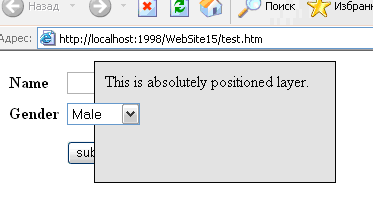 Note: This problem only appears in IE 6 and below.
When an absolutely positioned layer (div) is overlaid with a dropdown or some ActiveX component, the Z-index style sheet property does not work and the layer shows under such objects.
Reference: http://www.codeproject.com/KB/HTML/dropdown_div.aspx
Alexander Kleshchevnikov offers 3 great methods in his writeup to solve this problem. I've only tried out Method 2 and it works.
Thursday, December 10, 2009
Wednesday, December 9, 2009
onmouseout event doesn't work well with Div and timers
I am trying to keep my div visible while my cursor is still within the div area, and making it invisible again (after a short while) when the cursor moves out of the area.
Because for some strange reason, the onmouseout event acts like the onmousemove event. The timer (in the hide_menu function) gets activated when the mouse moves (even though my cursor is still within the div area) and thus my div becomes invisible after a while.
This would not work:
<div id="menu1"style="display:none;" onmouseout="delayhide_menu(this.id); >
The solution:
<div id="menu1" style="display:none;" onmouseout="delayhide_menu(this.id); onmouseover="display_menu(this.id);">
You need to define a onmouseover event to counter the activation of the onmouseout event whenever the mouse moves within the div. In addition, you need to add more lines of code in the display and hide menu functions concerning the timers.
<script type="text/javascript">var popupTimerHandle = null;function display_menu(id) {var menu_element = document.getElementById(id);menu_element.style.display = "block";if (popupTimerHandle != null) {clearTimeout(popupTimerHandle);popupTimerHandle = null;}}function hide_menu(id) {var menu_element = document.getElementById(named);menu_element.style.display = "none";}function delayhide_menu(id) {popupTimerHandle = setTimeout("hide_menu('" + named + "')", 1500);}</script ">
Friday, April 10, 2009
Add Scrollbar within Body of Page
You might want to do something like this:
Lorem ipsum dolor sit amet, consectetuer adipiscing elit. Pellentesque ullamcorper dictum est. Aenean ante diam, porttitor sed, sodales nec, scelerisque eu, lectus. Vestibulum auctor massa sit amet nibh malesuada consectetuer. Etiam augue felis, faucibus sed, mattis ac, imperdiet ac, felis. Morbi iaculis. Vestibulum augue mi, vulputate sed, tristique sit amet, ornare et, lectus. Sed rhoncus, pede nec adipiscing tristique, nibh libero facilisis sapien, eget rutrum eros erat eu tortor. Cras at magna. Etiam mattis. Aliquam erat volutpat. Donec risus. Fusce justo. Vivamus enim lacus, sagittis ut, tincidunt in, congue ut, orci. Praesent quis libero vel lectus mattis sagittis. Sed augue libero, viverra et, rutrum hendrerit, porta id, ligula. Integer lacinia.
Here's how you can achieve it using "div":
<div style="width: 100px; height: 200px; overflow: auto;"> |
You can control the height and width of the div and the overflow attribute signifies that the div is scrollable if the text overflows.
Source: http://www.htmlcodetutorial.com/help/sutra22436.html
Credit goes to Corey Bryant, Site Admin
Subscribe to:
Posts (Atom)
