Showing posts with label SharePoint. Show all posts

Wednesday, January 6, 2016

Troubleshooting SharePoint Alerts

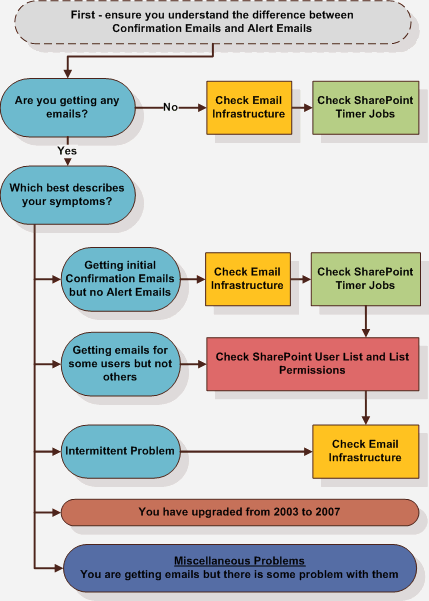
This post offers a solution if you are trying to solve "Getting initial confirmation emails but no alert emails" based on the diagram below.

(Image linked directly from http://sharepointalert.info/wp-content/uploads/2009/11/flowchart.gif)

It also assumes that you have done the necessary checks on the email infrastructure, Sharepoint timer jobs, list permissions, etc and there is nothing amiss.

Finally, it assumes that nothing has changed on your Sharepoint infrastructure recently and the problem just appeared out of the blue (meaning that it had worked before).

-----------------------------

Follow the steps below:
  1. Stop the OWSTIMER service on ALL of the MOSS servers in the farm.
  2. On the Index server, navigate to:                          
  3. Server 2003 location: Drive:\Documents and Settings\All Users\Application Data\Microsoft\SharePoint\Config\GUID and delete all the XML files from the directory. 
    Server 2008 location: Drive:\ProgramData\Microsoft\SharePoint\Config\GUID and delete all the XML files from the directory.
  4. Delete all the XML file in the directory. NOTE: ONLY THE XML FILES, NOT THE .INI FILE.
  5. Open the cache.ini with Notepad and reset the number to 1. Save and close the file.
  6. Start the OWSTIMER service on the Index server and wait for XML files to begin to reappear in the directory.
  7. After you see XML files appearing on the Index server, repeat steps 2, 3 & 4 on each query server, waiting for XML files to appear before moving to subsequent servers.
  8. After all of the query servers have all been cleared and new .xml files have been generated, proceed to the WFE and Application servers in the farm, following steps 2, 3, 4 and 5 for each remaining server 
Referenced & tried & tested from this link: http://blogs.msdn.com/b/josrod/archive/2007/12/12/clear-the-sharepoint-configuration-cache-for-timer-job-and-psconfig-errors.aspx

According to the post and Microsoft Support, sometimes the cache becomes corrupted and needs to be rebuilt. But we won't know why it would get corrupted :(

P/S: This issue came back 2 months later, and the above steps did not resolve the issue.

Sunday, September 14, 2014

Cannot package wsp in VS2008 for SP2007

Error:

SPService.svc is too busy


Resolution:
Turn on Sharepoint services.

Error:

VSeWSS Service Error: Error loading assembly XXX


Resolution:
Ensure IIS Website Central Admin has started.
App Pool ID should be the admin account and not Network Service.

Wednesday, September 3, 2014

Recover a deleted SharePoint site or site collection

Sharepoint 2007
The only way to recover a deleted site is through a database backup restore. Deleted sites and site collections do not go into the recycle bin.

Sharepoint 2010
Deleted sites and site collections go into the recycle bin, and can be restored from there.
http://www.mssharepointtips.com/tip.asp?id=1178

Sharepoint 2013
Deleted sites go into the recycle bin, and can be restored from there.
http://technet.microsoft.com/en-us/library/hh272540(v=office.15).aspx

You can also recover deleted site collections through PowerShell.
http://technet.microsoft.com/en-us/library/hh272537(v=office.15).aspx

Monday, April 14, 2014

Notes from Sharepoint 2013 Site Admin & Power User Training

SharePoint 2013 Site Templates: http://blog.cloudshare.com/2012/12/06/sharepoint-2013-site-templates/

------------------------------

When you create a site, 3 default access groups, with default permissions will be created for you.

1) Owners // Full Control
2) Members // Contribute/Edit (?)
3) Visitors // Read-Only

The default permissions can be changed. And you can also grant another group from another site the same set of permissions.
The downside is that if you are in the Members and Visitors group, you cannot see the "Site Permissions" page. You can only decipher who has access to the site based on the name of the group.

-------------------------------

SharePoint App Store is accessible from "Site Contents" > "Add an App" > "SharePoint Store".
URL: https://[Sharepoint Site URL]/layouts/15/storefront.aspx
Noteworthy Apps:
Corporate News App (announcement/latest news)
Mini Calendar (aggregated calendar)
PDF Publisher (merge PDF)

-------------------------------

Content type lets you "templatise" a SharePoint list item (document, calendar event, contact). You can set certain fields as mandatory, such that when you drag in a document for upload, the document remains checked out. You can use the "Quick Edit" feature to provide the details of the compulsory fields, and then perform a bulk check in.

You can link a new template to the Content Type via Site Settings // Site Content Types // [Content Type] // Advanced Settings.

-------------------------------

There is an "Access App", that lets you "host" your Access database on SharePoint.

-------------------------------


Friday, November 22, 2013

Sharepoint's Hidden User Profile List

Here's the URL: http://<your site collection URL>/_catalogs/users/simple.aspx

Credits go to Tobias Zimmergren - a site I frequent a lot when I need to get the URL.

Thursday, March 17, 2011

SharePoint's DateTimeControl.DateChanged Event BUG

Ok. So you want something to happen (e.g. update another DateTimeControl) when you change the value in the DateTimeControl.You realise that the DateTimeControl.DateChanged event could do the trick.

But NO...
Bugs I have identified:
1) The DateChanged Event does not get fired when you change the time
2) This snippet of code within the DateChangedEvent does not seem to work:
dtEnd.SelectedDate = dtStart.SelectedDate

* Bug 1 is known and so far here's the only workaround that I know (compliments to myself):
Insert a Jquery hack to "catch" the time change event:

$(document).ready(function() {
   //Hour drop down list 
   $("#ctl00_PlaceHolderMain_dtStart_dtStartDateHours").change(function() {
      var idx = $("#ctl00_PlaceHolderMain_dtStart_dtStartDateHours option").index($("option:selected"));
      if (idx < 24) idx++;
      $("#ctl00_PlaceHolderMain_dtEnd_dtEndDateHours option:eq(" + idx + ")").attr("selected", "selected");
});


//Minute drop down list
     $("#ctl00_PlaceHolderMain_dtStart_dtStartDateMinutes").change(function() {
      var idx2 = $("#ctl00_PlaceHolderMain_dtStart_dtStartDateMinutes option").index($("option:selected"));
      $("#ctl00_PlaceHolderMain_dtEnd_dtEndDateMinutes option:eq(" + idx2 + ")").attr("selected", "selected");
    });
});
The change event for the minute drop down list doesn't seem to work as yet. It is returning idx2 as -1. Will continue exploring on this.

A/N: Still not sure why it's not working, but here's another workaround:
$("#ctl00_PlaceHolderMain_dtEnd_dtEndDateMinutes").val($("#ctl00_PlaceHolderMain_dtStart_dtStartDateMinutes option:selected").val());
I realise that I don't need to get the index of the selected option as I can just replicate the values in the end date drop down.

* Bug 2 is less well-known, can't seem to find any solutions on google. Here's my current workaround (compliments to myself as well):
Add a "OnValueChangeClientScript" property to the DateTimeControl which calls "javascript:updateDates();".

function updateDates() {
$("#ctl00_PlaceHolderMain_dtEnd_dtEndDate").val($("#ctl00_PlaceHolderMain_dtStart_dtStartDate").val());
}

Monday, January 10, 2011

How to get sharepoint list items with an absolute url?

string ListUrl = "http://localhost/subsite/Lists/ResourceBooking/AllItems.aspx";


using (SPSite mySite = new SPSite(ListUrl))
            {
                using (SPWeb myWeb = mySite.OpenWeb())
                {
                    SPList myList = myWeb.GetList(ListUrl);
                    foreach (SPListItem item in myList.Items)
                    {
                    }
                }
            }

Sunday, January 2, 2011

CAML Query Lookup

<Query>
  <Where>
    <Eq>
      <FieldRef Name='Fruit' />
      <Value Type='Lookup'>15</Value>
    </Eq>
  </Where>
</Query>

Doesn't Work, but this works:

<Query>
  <Where>
    <Eq>
      <FieldRef Name='Fruit' />
      <Value Type='Lookup'>Grapes</Value>
    </Eq>
  </Where>
</Query>

Correct query:
<Query>
  <Where>
    <Eq>
      <FieldRef Name='Fruit' LookupId='TRUE' />
      <Value Type='Lookup'>15</Value>
    </Eq>
  </Where>
</Query>

Monday, December 27, 2010

The location fo STSADM in WSS 3.0

C:\Program Files\common files\microsoft shared\web server extensions\12\bin

Thursday, December 16, 2010

PropertyData that is returned when you call MOSS' UserProfileService

Code:

MOSSUserProfile.UserProfileService ups = new MOSSUserProfile.UserProfileService();
ups.Credentials = CredentialCache.DefaultNetworkCredentials;
MOSSUserProfile.PropertyData[] props = ups.GetUserProfileByName(K2.ProcessInstance.Originator.Name);


string str = "";
int counter = -1;
foreach (MOSSUserProfile.PropertyData p in props)
{
                counter++;
               
                str += "(" + counter + ")" + p.Name + ": ";
                if (p.Values != null && p.Values.Length > 0) str += p.Values[0].Value.ToString() + ";";
                else str += ";";
}


Output:
(0)UserProfile_GUID: 22e44299-1d1b-4a30-967e-3b041d717a1f;
(1)AccountName: WORLD\a_fkf;
(2)FirstName: a_fkf;
(3)LastName: ;
(4)PreferredName: a_fkf;
(5)WorkPhone: ;
(6)Office: ;
(7)Department: ;
(8)Title: ;
(9)Manager: ;
(10)AboutMe: ;
(11)PersonalSpace: ;
(12)PictureURL: ;
(13)UserName: a_fkf;
(14)QuickLinks: ;
(15)WebSite: ;
(16)PublicSiteRedirect: http://mdevsp_fkf:81/personal/a_fkf/;
(17)SPS-Dotted-line: ;
(18)SPS-Peers: ;
(19)SPS-Responsibility: ;
(20)SPS-Skills: ;
(21)SPS-PastProjects: ;
(22)SPS-Interests: ;
(23)SPS-School: ;
(24)SPS-SipAddress: ;
(25)SPS-Birthday: ;
(26)SPS-MySiteUpgrade: ;
(27)SPS-ProxyAddresses: ;
(28)SPS-HireDate: ;
(29)SPS-ResourceAccountName: ;
(30)SPS-MasterAccountName: ;
(31)Assistant: ;
(32)WorkEmail: a_fkf@world.com;
(33)Fax: ; 


Wednesday, December 15, 2010

SharePoint Web Services


WSS Web ServicesWeb Reference
Administration Servicehttp:///_vti_adm/admin.asmx
Alerts Servicehttp:///_vti_bin/alerts.asmx
Document Workspace Servicehttp:///_vti_bin/dws.asmx
Forms Servicehttp:///_vti_bin/forms.asmx
Imaging Servicehttp:///_vti_bin/imaging.asmx
List Data Retrieval Servicehttp:///_vti_bin/dspsts.asmx
Lists Servicehttp:///_vti_bin/lists.asmx
Meetings Servicehttp:///_vti_bin/meetings.asmx
Permissions Servicehttp:///_vti_bin/permissions.asmx
Site Data Servicehttp:///_vti_bin/sitedata.asmx
Site Servicehttp:///_vti_bin/sites.asmx
Users and Groups Servicehttp:///_vti_bin/usergroup.asmx
Versions Servicehttp:///_vti_bin/versions.asmx
Views Servicehttp:///_vti_bin/views.asmx
Web Part Pages Servicehttp:///_vti_bin/webpartpages.asmx
Webs Servicehttp:///_vti_bin/webs.asmx
Area Servicehttp:///_vti_bin/areaservice.asmx
Query Servicehttp:///_vti_bin/search.asmx
User Profile Servicehttp:///_vti_bin/userprofileservice.asmx
SPS Crawl Servicehttp:///_vti_bin/spscrawl.asmx
Outlook Adapter Servicehttp:///_vti_bin/outlookadapter.asmx

Thursday, September 16, 2010

CSS Reference Chart for SharePoint 2007

http://www.heathersolomon.com/content/sp07cssreference.htm

CSS Reference Chart for SharePoint 2007 (Microsoft Office SharePoint Server 2007 and Windows SharePoint Services v3)

Friday, August 27, 2010

SharePoint Dispose Checker Tool


Resource Page Description

SPDisposeCheck is a tool to help you to check your assemblies that use the SharePoint API so that you can build better code. It provides assistance in correctly disposing of certain SharePoint objects to help you follow published best practice. This tool may not show all memory leaks in your code. Further investigation is advised if you continue to experience issues.

SPDisposeCheck.exe takes the path to a managed .DLL or .EXE or the path to a directory containing many managed assemblies. It will recursively search for and analyze each managed module attempting to detect coding patterns based on the MDSN article.


Please review the MSDN article on using Deploy in SharePoint applications here

The SPDisposeCheck tool can be downloaded here.

Roger Lamb maintains a blog for the SPDisposeCheck team here.


Wednesday, August 18, 2010

SharePoint: Check Item Level Permission

Use
listItem.DoesUserHavePermissions(perms)
This method will return true or false.

Avoid
list.CheckPermissions(perms)
This method throws an Unauthorised Access Exception if current user does not have permissions, which will override the try-catch and causes an auto-redirection to an Access Denied Page.


Display Silverlight in SharePoint Content Editor Webpart


The steps:
  1. Created a web part page document library
  2. Uploaded xap into the library
  3. Create a new web part page in the library
  4. Added a content editor web part to the page.
  5. Added an object tag pointing to the XAP file in the source code of the content editor web part

And, voila.... nothing displayed! Played with adding the Silverlight.js file to the library, and various other techniques. Finally found the key was the interaction of the object tag width and height with the rendered dimensions of the web part.

Solved by either:

  • Setting a fixed height and width in the web part appearance properties, and giving the object tag a height and width of 100%, OR
  • Setting an absolute height and width for the object tag and leaving the web part with non-fixed height and width

Tuesday, August 3, 2010

Attaching Event Receivers to Content Types

When you define a content type with a feature, you create 2 XML files as shown below:

  • Feature.xml – Use this XML file to define the metadata for the new feature. The ElementManifests element points to the location of the 2nd XML file storing all of the detailed information on the feature itself.
  • Elements.xml – Use this file to define the assembly that encapsulates the event handler, the class itself, and also a sequence number that specifies the order.

Elements xmlns="http://schemas.microsoft.com/sharepoint/">
<ContentType ID="0x0100c07095261b4f48408d60ad8654b69d68" Name="DevelopingCT" Group="Development" Description="Developing Content Type" Version="0">
<FieldRefs>
<FieldRef ID="{0c177b88-bf35-4692-8456-cc14aaabecc0}" Name="DevelopingCTField" />
</FieldRefs>
<XmlDocuments>
<XmlDocument NamespaceURI="
http://schemas.microsoft.com/sharepoint/events">
<spe:Receivers xmlns:spe="
http://schemas.microsoft.com/sharepoint/events">
<Receiver>
<Name>ItemAdded</Name>
<Type>ItemAdded</Type>
<SequenceNumber>1</SequenceNumber>
<Assembly>AssemblyName, Version=1.0.0.0, Culture=neutral, PublicKeyToken=TokenNumber</Assembly>
<Class>Namespace.ClassName</Class>
<Data>
</Data>
<Filter>
</Filter>
</Receiver>
<Receiver>
<Name>ItemAdding</Name>
<Type>ItemAdding</Type>
<SequenceNumber>2</SequenceNumber>
<Assembly>AssemblyName, Version=1.0.0.0, Culture=neutral, PublicKeyToken=TokenNumber</Assembly>
<Class>Namespace.ClassName</Class>
<Data>
</Data>
<Filter>
</Filter>
</Receiver>
</spe:Receivers>
</XmlDocument>
</XmlDocuments>
</ContentType>
</Elements>


Note: Event receivers in content types are defined in a different section of the elements file. The Receiver XmlDocument resides in the http://schemas.microsoft.com/sharepoint/events namespace.

Related post: Writing Event Receiver Class in Code

References:

http://social.msdn.microsoft.com/Forums/en-US/sharepointdevelopment/thread/fecdfc46-3223-4b9d-b218-29bf475b9cd6

http://stackoverflow.com/questions/561835/how-do-you-bound-an-event-receiver-to-a-specific-custom-content-type

http://www.wrox.com/WileyCDA/Section/Programming-Event-Handling-in-Windows-SharePoint-Services.id-306329.html

http://download.microsoft.com/download/b/d/4/bd45c0a8-74bc-4e3a-9735-a715b902f89c/03-EventHandlers.docx

Wednesday, July 21, 2010

Opacity in CSS

http://www.quirksmode.org/css/opacity.html

A/N: This still doesn't work when I'm in a SharePoint LayoutsPageBase page (With application.master)

IE compatibility note

If you want opacity to work in all IE versions, the order should be:

.opaque {  -ms-filter:"progid:DXImageTransform.Microsoft.Alpha(Opacity=50)"; // first!  filter: alpha(opacity=50);     // second! } 

If you don’t use this order, IE8-as-IE7 doesn’t apply the opacity, although IE8 and a pure IE7 do.